Shazam
Autonomous AI Agent Teams
Coordinate multiple Claude AI agents in hierarchical teams. Define roles, delegate tasks, and let your AI company ship software autonomously.

Install
One command. Checks dependencies, builds, and installs.
curl -fsSL https://raw.githubusercontent.com/raphaelbarbosaqwerty/shazam-cli/main/setup.sh | bashMenu Bar App
Monitor all your AI agent teams from the macOS menu bar. Start/stop the daemon, see project status, get notifications.
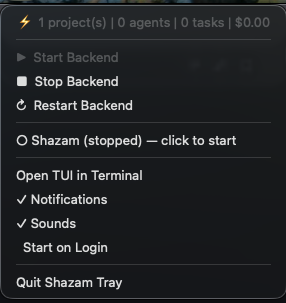
Or install via CLI: shazam-tray is included in the installer above.
Native Dashboard
Manage projects, monitor agents, view tasks — all from a native desktop app. Built with Tauri.
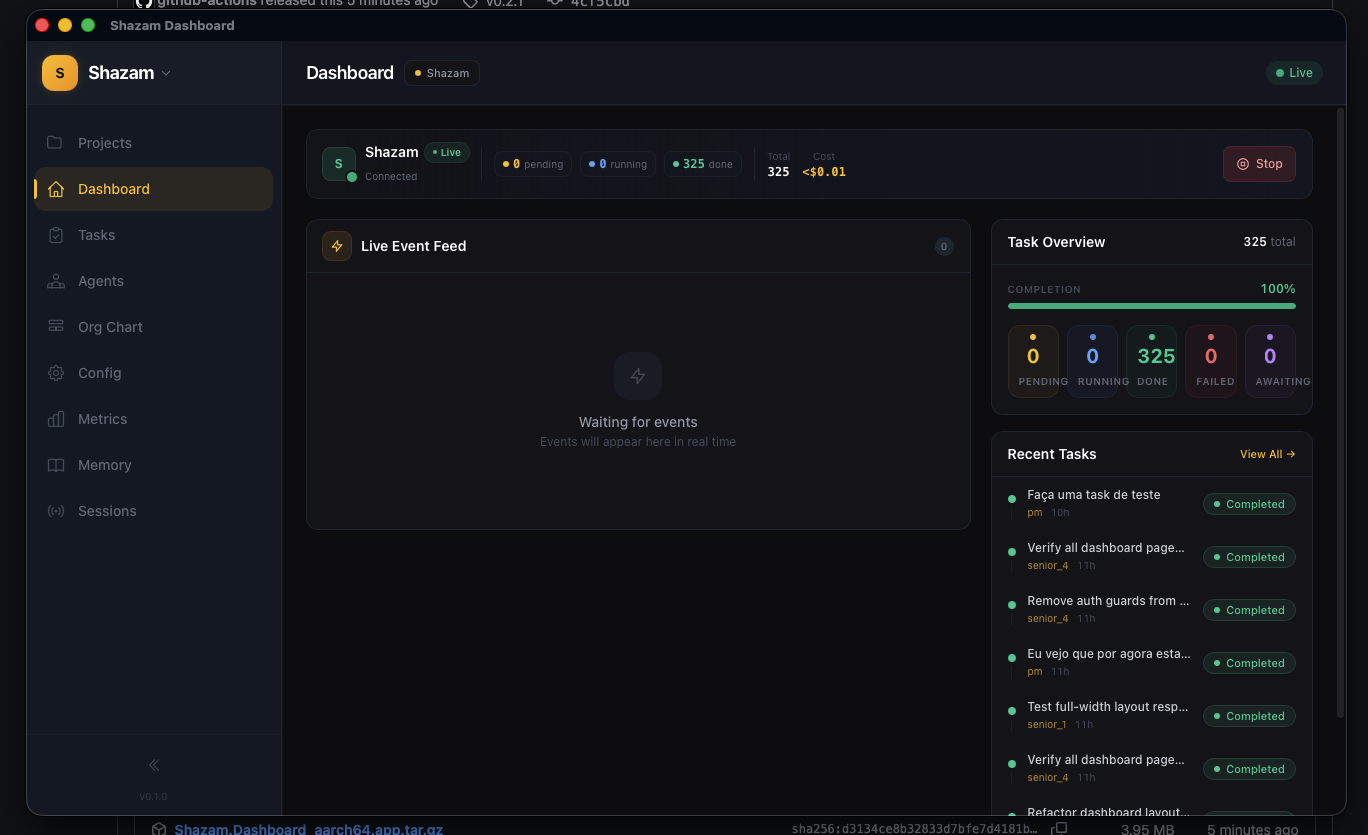
shazam daemon startAgent Hierarchy
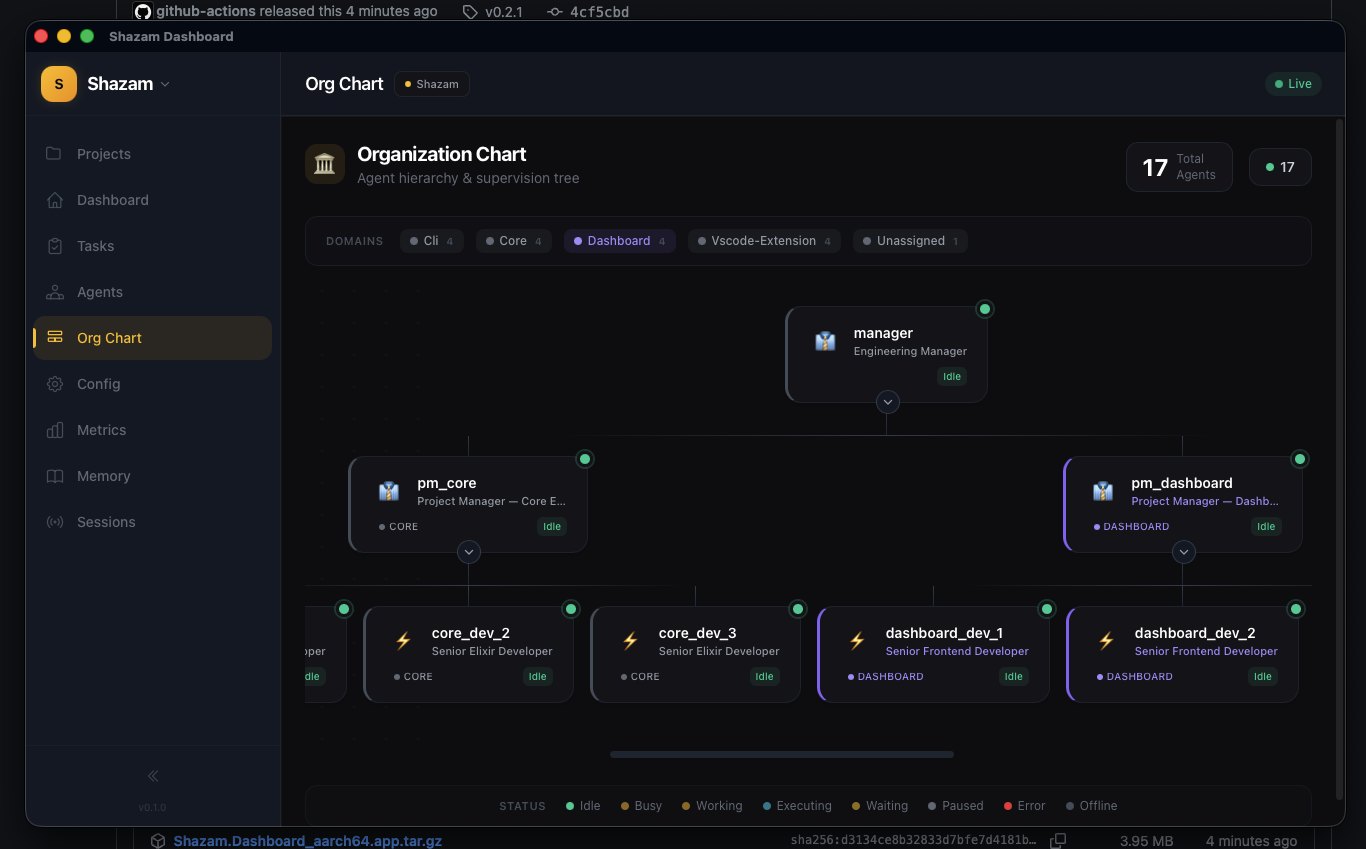
Visualize your entire team structure. Engineering Manager delegates to PMs, PMs coordinate developers across domains.
Core Capabilities
Everything you need to orchestrate autonomous AI agent teams at scale.
Persistent Daemon
Run the backend as a persistent service. Agents keep working even when you close the terminal. Start with shazam daemon start.
Menu Bar App (macOS)
Shazam Tray sits in your menu bar showing real-time project status, agent counts, and costs. Start/stop the backend with one click.
Multi-Project Simultaneous
Run multiple projects on the same daemon. Each project connects via WebSocket with isolated tasks, agents, and metrics.
Autonomous Company Model
Hierarchical agent teams with CEO, PM, Dev, QA, and Analyst roles working together under a chain of command.
Multi-Provider
Use Claude Code, Codex, Cursor, or Gemini CLI per agent. Mix providers in the same team based on each agent role.
Plugin System
8 lifecycle hooks for custom middleware. Plugins in .shazam/plugins/ are compiled at runtime. Built-in: GitHub Projects, JSON Logger, Secrets.
Context Persistence
Cross-provider context continuity with TF-IDF search. Agents learn from past tasks and share knowledge via topic files.
Plan System
Create phased execution plans with architecture decisions, acceptance criteria, and risks. Approve to auto-create all tasks.
Human-in-the-Loop
PM-created subtasks go through an approval queue. macOS notifications alert you when approval is needed.
Native Notifications
macOS notifications for task failures and approval requests. Sound alerts on important events. All toggleable from the menu bar.
Workspace Enforcement
Domain restrictions and workspace isolation prevent agents from editing files outside their assigned area.
Real-time Dashboard
Rust TUI with sparklines, task detail, markdown rendering. Plus REST API + WebSocket for web dashboards and VS Code extensions.
How It Works
Get from zero to an autonomous AI team in minutes.
Install & Configure
One curl command installs everything: CLI, TUI, Tray app, and backend. Then shazam init creates your shazam.yaml with agent hierarchy.
Start the Daemon
Run shazam daemon start to boot the persistent backend. Or just run shazam — it auto-detects and boots inline if no daemon is running.
Work Across Projects
Open shazam in any project directory. Multiple projects connect to the same daemon. The menu bar tray shows all active projects at a glance.
Agents Execute Autonomously
Type a task or paste requirements. The PM analyzes, creates a plan, delegates to developers. Close the terminal — agents keep working in the daemon.
Project History
The journey from idea to open-source orchestrator.
The Idea
Born from the need to coordinate multiple AI agents working on the same codebase without conflicts or duplicated effort.
Clawster Era
Initial prototype built in Elixir/OTP, proving that GenServer-based agent management could handle concurrent AI workflows.
Shazam v1.0
Full orchestrator with hierarchical companies, multi-provider support, plugin system, context persistence, and Rust TUI.
Daemon & Tray (v2.0)
Persistent backend daemon that keeps agents running. macOS menu bar app for real-time monitoring. Multiple projects run simultaneously on one daemon.
Open Source
Released to the community. 4 repos: shazam-core (engine), shazam-cli (CLI + TUI), shazam-tray (menu bar), shazam-dashboard (web).
Ready to Build Your AI Team?
Get started with Shazam in minutes. Define your agents, set up your company, and let them work.